
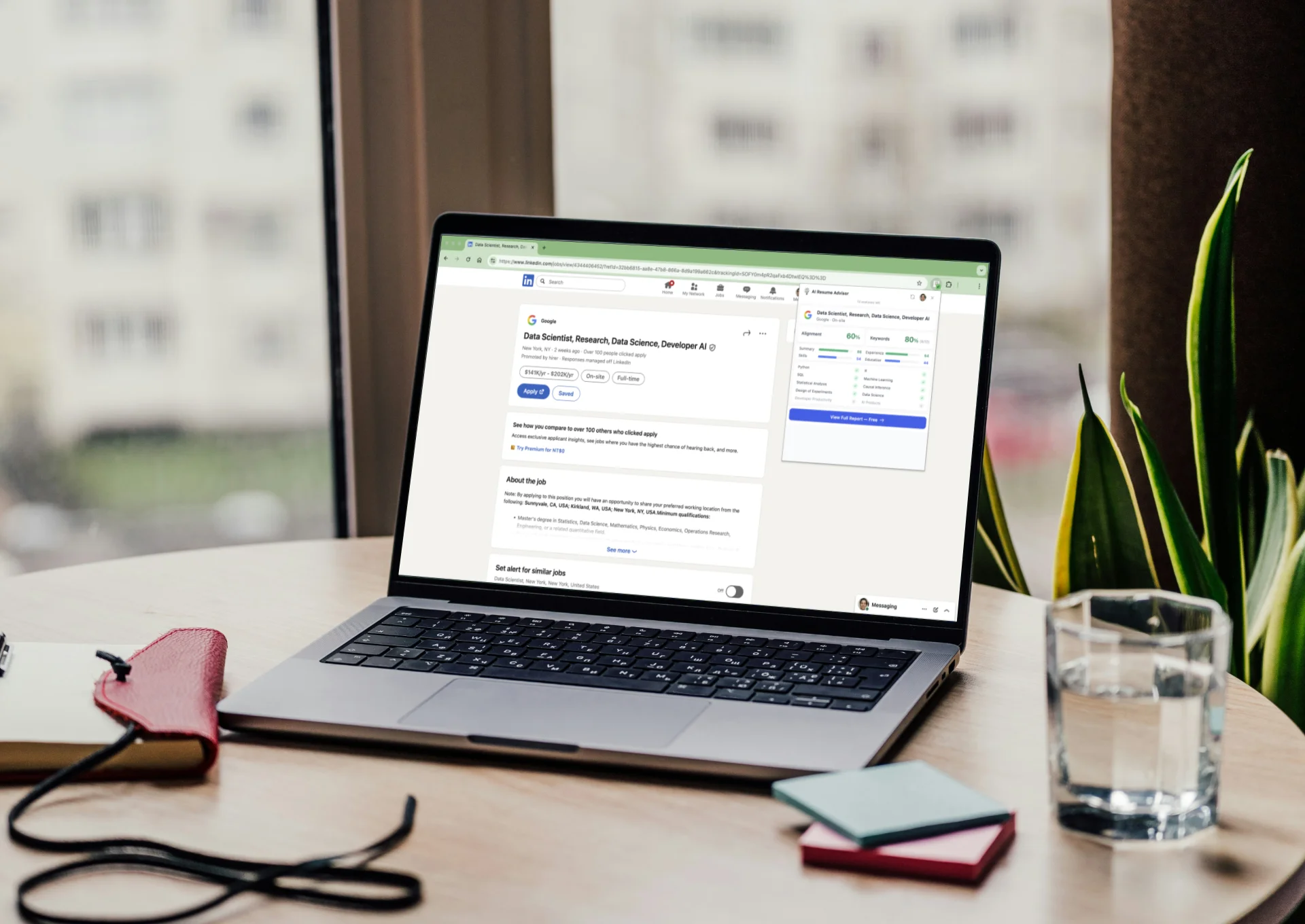
Disclosure: I’m the creator of AI Resume Advisor, one of the tools mentioned in this list. I’ve tested all these extensions myself and tried to be as objective as possible.
LinkedIn is where jobs get found. But let’s be honest—the native experience isn’t great for job seekers.
You can’t easily tell if you’re qualified for a role before applying. You can’t track which jobs you’ve already applied to. You can’t filter out positions that need 10 years of experience when you only have 3.
That’s where Chrome extensions come in.
I’ve spent weeks testing dozens of LinkedIn extensions. Most are built for recruiters and salespeople. But some are genuinely useful for job seekers.
Here are the ones worth installing.
How I Categorized These Extensions
LinkedIn extensions for job seekers fall into three categories:
- Job-Fit Analysis — Check if you’re qualified before applying
- Job Tracking & Autofill — Track applications and speed up form filling
- LinkedIn Enhancements — Add features LinkedIn doesn’t provide natively
I’ll cover the best tools in each category.
Job-Fit Analysis
AI Resume Advisor
What it does: Uses AI semantic analysis (not just keyword matching) to analyze LinkedIn job postings and tell you instantly whether you’re a good fit—before you invest hours tailoring your resume.
Open any LinkedIn job page, click the extension, and in 3 seconds you’ll see:
- Your overall match percentage with the role
- Section-by-section breakdown (skills, experience, education)—so you know exactly where to improve
- Which keywords from the JD you have, and which you’re missing
Why it’s useful: Reading a job description takes 20 minutes. Tailoring your resume takes 2-3 hours. Then HR spends 6 seconds and moves on. This extension answers “Am I even qualified?” and “Where are my weak points?” before you submit—so you know exactly what to fix.
Pricing: 20 free analyses on signup, then 5 free per day. Paid plans for heavy users.
Related: How to Diagnose Your Resume Before Applying
Jobalytics
What it does: An all-in-one ATS resume checker and job tracker. Upload your resume and instantly see a match score (0-100), matched keywords, and missing keywords—directly on job pages. Also includes a Kanban-style job tracker and AI cover letter generator.
Why it’s useful: Over 75% of resumes are filtered by ATS before reaching a recruiter. Jobalytics shows exactly which keywords to add before you apply. Works on LinkedIn, Indeed, Glassdoor, and 15+ recruiting platforms.
Best feature: No copy-paste required—analysis happens directly on the job page.
Pricing: Free to use.
Rating: 4.1/5 on Chrome Web Store
Job Tracking & Autofill
Huntr
What it does: A Kanban-style job tracker that lets you save jobs from any site—aggregators like LinkedIn and Indeed, boards like Dice, and ATS systems like Greenhouse and Lever. Also auto-fills job applications in one click.
Why it’s useful: If you’re applying to multiple jobs, you need a system. Huntr replaces messy spreadsheets with a visual board where you can track applications from “Wishlist” to “Applied” to “Interview” to “Offer.” It saves job details (title, salary, location, company) automatically.
Best feature: One-click autofill that works on thousands of sites and top ATS systems—cuts application time to seconds.
Pricing: Free tier is generous. Paid plans add AI resume features.
Rating: 4.8/5 (250,000+ users, 5 million jobs tracked)
Teal
What it does: Similar to Huntr—saves jobs, tracks applications, and provides resume keyword suggestions.
Why it’s useful: The “Job Match” feature shows how well your resume matches each saved job. Good for prioritizing which jobs to apply to first.
Best feature: Works across 40+ job boards, not just LinkedIn.
Pricing: Free tier available.
Rating: 4.9/5
Simplify Copilot
What it does: Auto-fills job applications across thousands of portals (Workday, Greenhouse, Lever, etc.), identifies missing keywords in your resume, generates AI resumes/cover letters, and tracks applications in one dashboard.
Why it’s useful: Autofill is unlimited and free forever. The keyword analyzer shows what’s missing from your resume for each job.
Best feature: Works on the notoriously tedious Workday applications.
Pricing: Autofill is free with no limits. AI resume/cover letter features are paid ($19.99/week).
Rating: 4.9/5 (500,000+ users)
Careerflow
What it does: All-in-one tool: LinkedIn profile scoring (0-100), job tracker for 45+ platforms, and AI cover letter generator.
Why it’s useful: The LinkedIn Optimizer scores each section of your profile and tells you what to fix. Job tracker saves postings from LinkedIn, Indeed, and 40+ sites.
Pricing: LinkedIn Optimizer and Job Tracker are free. AI features are Premium.
Rating: 4.4/5 (200,000+ users)
LinkedIn Enhancements
LinkedIn YOE Filter
What it does: Shows YOE badges on job cards (e.g., “YOE: 3-5 years”) and visa sponsorship status. Lets you filter out positions requiring more experience than you have.
Why it’s useful: LinkedIn doesn’t let you filter by experience level. Perfect for new grads, entry-level professionals, and international candidates who want to skip mismatched positions.
Pricing: Free
Rating: 5.0/5 on Chrome Web Store
LinkedIn Job Stats Viewer
What it does: Reveals hidden job posting statistics (total views, total applicants) directly on LinkedIn job pages. Updates automatically as you browse.
Why it’s useful: Quickly assess competitiveness—seeing “500 applicants” might make you reconsider, while “10 applicants” could mean less competition.
Pricing: Free
Rating: 3.0/5 on Chrome Web Store
LinkedIn Jobs Filter
What it does: Hides irrelevant job posts (“Applied,” “Viewed,” “We won’t show you this job again”) and filters by keywords (e.g., “Senior,” “Developer”). Syncs settings across devices.
Why it’s useful: Declutters your feed and shows only relevant opportunities. Supports all languages.
Pricing: Free
Comparison Table
| Extension | Category | Free Tier | Best For | Rating |
|---|---|---|---|---|
| AI Resume Advisor | Job-Fit Analysis | ✅ | AI semantic analysis (not just keywords) | 5.0 |
| Jobalytics | Job-Fit Analysis | ✅ | ATS keyword matching | 4.1 |
| Huntr | Tracking & Autofill | ✅ | Visual application tracking | 4.8 |
| Teal | Tracking & Autofill | ✅ | Multi-board job saving | 4.9 |
| Simplify Copilot | Tracking & Autofill | ✅ | Speeding up applications | 4.9 |
| Careerflow | Tracking & Autofill | ✅ | LinkedIn profile + job tracking | 4.4 |
| LinkedIn YOE Filter | LinkedIn Enhancements | ✅ | Experience-based filtering | 5.0 |
| LinkedIn Job Stats Viewer | LinkedIn Enhancements | ✅ | Seeing applicant counts | 3.0 |
My Recommended Setup
If you’re actively job searching, here’s what I’d install:
For job-fit analysis:
- AI Resume Advisor (I’m biased, but it genuinely saves time)
For tracking & autofill:
- Huntr or Teal (pick one—they do similar things)
- Simplify Copilot (the Workday autofill is a game-changer)
For LinkedIn enhancements:
- LinkedIn YOE Filter (especially if you’re early-career or need visa sponsorship)
You don’t need all of them. Pick 2-3 that solve your biggest pain points.
What About Sales/Recruiter Extensions?
You might have seen extensions like Apollo.io, Lusha, or Kaspr recommended in “best LinkedIn extensions” lists. Those are built for sales teams and recruiters—they find contact info for outreach.
Unless you’re doing cold outreach to hiring managers, you probably don’t need them.
Final Thoughts
The job search is already exhausting. Good tools won’t find you a job, but they can remove friction from the process.
Start with one or two extensions. See if they actually save you time. Add more only if you need them.
And if you’re spending hours applying to jobs without knowing if you’re even qualified—that’s the first problem to solve.